
Verify Game APK Version: Simple Safety Guide for Android & iOS
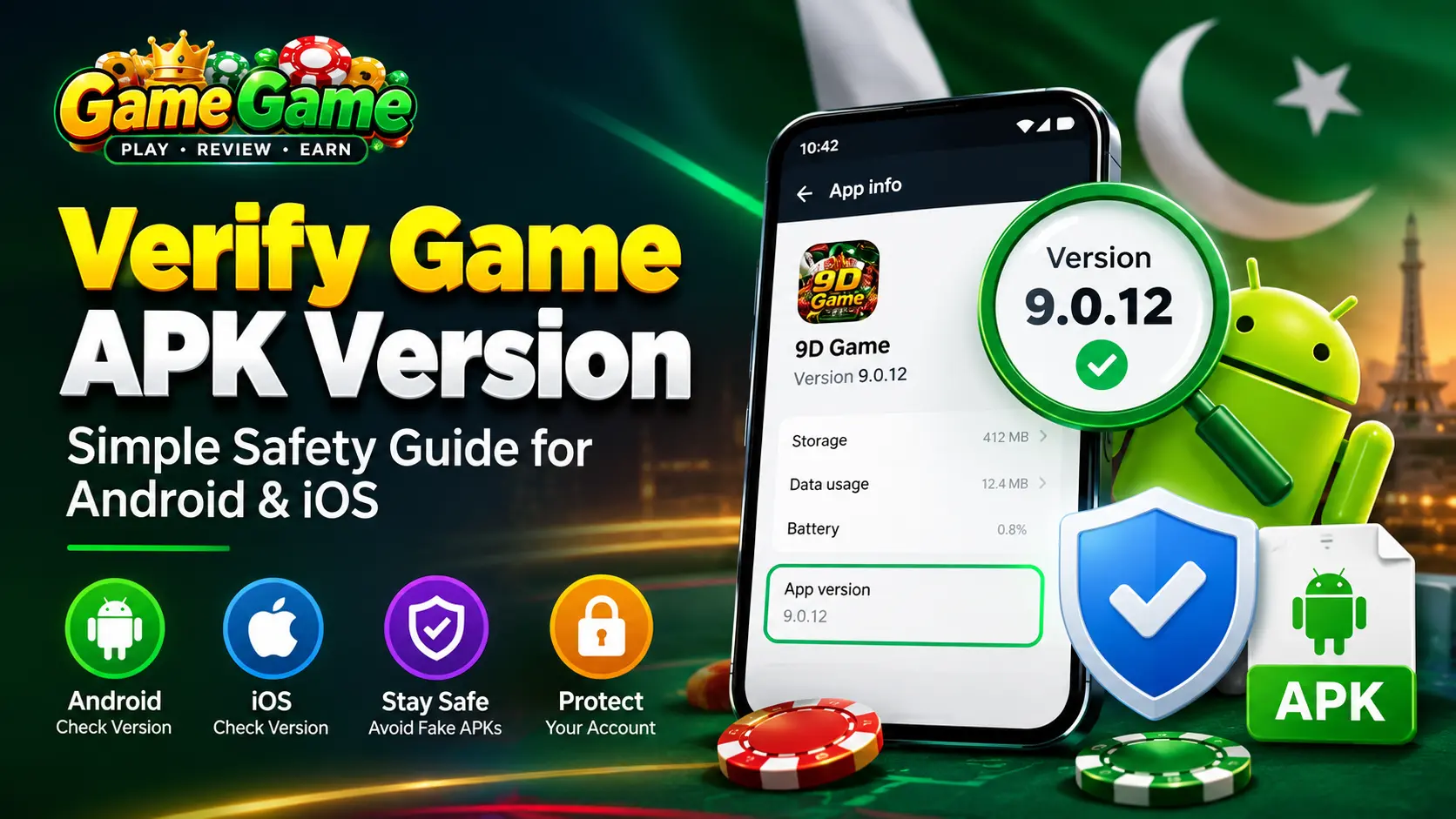
If you download gaming or earning apps from outside official app stores, you must verify game APK version before you install or update the file. A wrong or modified APK can steal your data, block your withdrawals, or install malware. This guide explains the checks for Android and iOS in simple steps.
Table of Contents
Quick Answer
To verify a game APK version on Android, compare the versionName (the visible version name) and versionCode (the internal build number) in the file against the official developer site. You can do this on a computer using the aapt2 command line, or on your phone by checking the App Info page. On iOS, open Settings, tap the app, and read the version number directly. If the versionCode has not changed after an update on Android, it is a fake file.
Our Commitment to Your Safety
When you read a review on our site, you are getting verified information. We do the heavy lifting for you. Before we publish any review, our team actively works to verify game APK version metrics of the latest release.
We check the exact versionCode and versionName of the file. This helps protect you from fake updates and modified files. When we confirm the latest APK version, it means the safety steps and platform details we share match the actual file you will download.
Why You Need to Verify Game APK Version
Apps shared as standalone APK files do not go through the normal store review process. Anyone can repackage them. When you verify game APK version, you confirm that the file is the real build from the developer and not a modified copy.
Common risks of skipping this check include:
- Hidden scripts that change game or reward results
- Fake update screens that ask for your password or payment details
- Withdrawal systems that lock your funds with no explanation
- Malware that reads your messages, contacts, or banking apps
- No legal recourse because the app sits outside local regulators
What Does Verify Game APK Version Mean?
Every Android app carries two version numbers inside its package file. To verify game APK version, you compare these two numbers with the official release.
| Field | What It Shows | Why It Matters |
|---|---|---|
| versionName | The visible version name, such as 9.0.12 | This is what review sites and app menus display |
| versionCode | The internal build number, such as 312 | This must increase with every real update |
If an app claims to fix a withdrawal bug but the versionCode is the same or lower than the old file, the APK was not rebuilt. That is a major red flag.
Method 1: Verify Game APK Version on a Computer
This is the most reliable method because you read the file directly and ignore anything the app screen shows.
- Install the Android SDK Build-Tools on your computer.
- Copy the APK file to a known folder.
- Open Terminal on macOS or Linux, or Command Prompt on Windows.
- Run the command below and point it to your file.
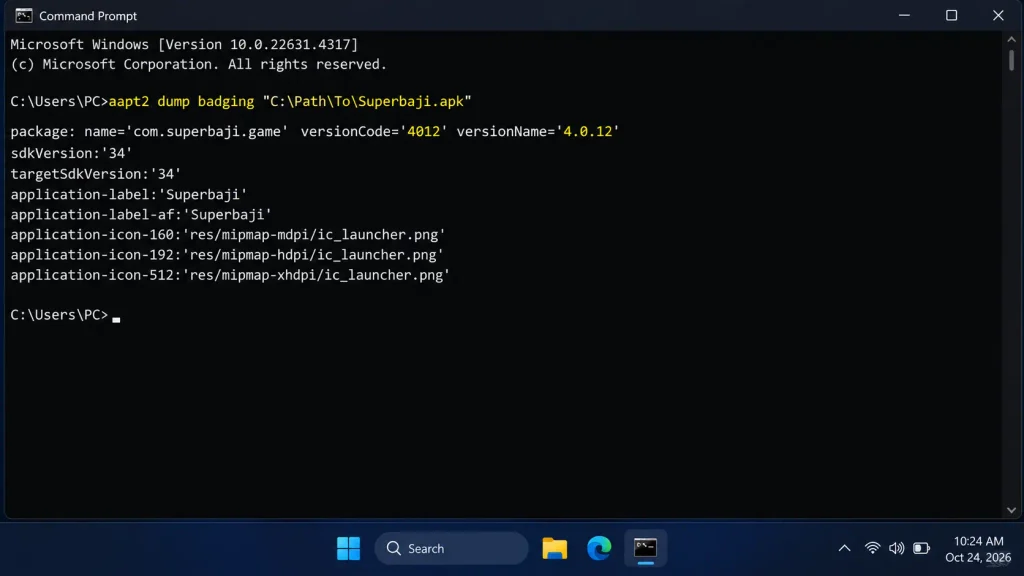
On Windows, run the following command to verify the Superbaji APK version and check its package details, as shown in the screenshot below.
Windows:
aapt2 dump badging "C:\Path\To\Game.apk"macOS or Linux:
aapt2 dump badging "/Path/To/Game.apk"- Find the line that starts with package. It will look like this:
package: name='com.platform.game' versionCode='312' versionName='9.0.12'- Compare versionCode and versionName with the official developer page or the previous file you already trust.
Method 2: Verify Game APK Version on Android
Use this method when the app is already installed on an Android phone or tablet.
- Open the Settings app on your device.
- Scroll down and tap Apps (or Apps & notifications on some models).
- Find and tap the app you want to check.
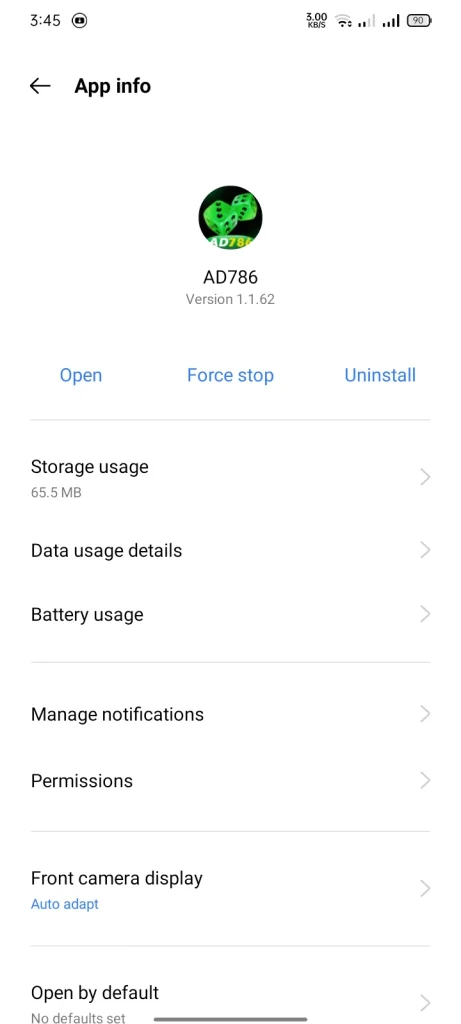
- The app version will appear on the App Info page. On some devices, you may need to scroll to the very bottom of the page.
This works because the Android system reads the installed package, not the app’s own menu. A fake in-app version screen cannot hide the real number here.
Given below is an image of showing the apk version of a game ad786 .
Method 3: Verify App Version on iOS (iPhone & iPad)
Apple’s iOS does not use APK files. Apps come only from the App Store, which has its own review process. You cannot install a standalone game file on iOS, so the risks of modified APKs do not apply. However, you should still confirm that you are running the latest official version.
How to check the version on iPhone or iPad:
- Open the Settings app on your iPhone or iPad.
- Scroll down and find the app in the list.
- Tap the app. The Version number will be displayed.
Alternative method using the App Store:
- Open the App Store.
- Search for the app and tap on it.
- Scroll down to the Version History section.
- The most recent version number will be shown along with the release notes.
Why iOS is different: Apple reviews every app and every update for privacy, security, and safety before it reaches the App Store. If you only download from the App Store, you are already protected from repackaged files. Still, check the version to ensure you have the latest security fixes.
The Ultimate Check: Verify the APK Hash (MD5/SHA-256)
If you want to be absolutely sure the file has not been tampered with, check its digital fingerprint.
- The official developer website usually lists a long string of letters and numbers next to the download (the Hash).
- Upload your downloaded file to VirusTotal to generate its hash and scan it against over 70 antivirus engines.
- If the two strings match exactly, the file is 100% original. If they do not match, delete it immediately.
Tool Comparison: How to Analyze Your APK
If you do not want to use command lines, here is a breakdown of the tools you can use on Android.
| Tool or Method | Best For | Pros | Cons |
|---|---|---|---|
| Command Line (aapt2) | Desktop users | 100% accurate, reads raw code | Requires PC and technical setup |
| Android App Info (Settings) | Mobile users | Built-in, no extra apps needed | Only works after installation |
| VirusTotal | Quick checks | Free, scans with 70+ engines, no installation required | Relies on third-party website security |
| APK Analyzer | Advanced mobile users | Open-source, ad-free, shows certificates, permissions, and full manifest | You must download another APK to use it |
Red Flags That Mean the APK Failed Verification
Stop using the app if you see any of these signs on Android:
- The versionCode did not change after an update
- The app asks for permissions it does not need, such as SMS or contacts
- The download link is not the official website or official channel
- The app hides the App info page or blocks access to it
- Withdrawals need a new deposit or a referral before they unlock
- There is no self-exclusion, deposit limit, or loss limit option
- The package name is a random string instead of the brand name
Safe Download Rules
- Always use the official brand website. Avoid short links on WhatsApp or Telegram.
- Never download from pop-up ads. Clicking the wrong download button often leads to malware.
- Check the file size. If the official app is usually 50MB, and your new download is 15MB, it is likely missing core files or contains malware.
- Keep Google Play Protect turned on. It scans your device for harmful apps and warns you about malicious installations.
Warning: Do Not Use Modded or Hacked APKs
If an APK claims to offer an unlimited money hack or a mod menu, it is almost certainly malware. Earning platforms use server-side validation. The app cannot change your balance; instead, the hack steals your login credentials and banking details.
Legal and Money Risks in Pakistan
Pakistan gambling laws restrict public wagering, lotteries, and organised bookmaking. Physical enforcement usually targets betting shops and casinos, but the same rules apply to online spaces.
Most earning and betting APKs used in Pakistan are hosted offshore. They sit outside any local gambling regulator or licensing authority. This creates two problems:
- You have no legal path to recover money if the platform freezes your account
- You cannot confirm that the operator follows fair play or payment rules
Unverified apps often run weak payment systems. Funds move through manual transfers, unencrypted channels, or crypto wallets with no transaction trail. Once money leaves your account, it can be locked without notice.
Why Version Tracking Matters in the iGaming Supply Chain
A single app screen can hide a large B2B chain. One brand may use a casino platform provider, a white label setup, a game aggregator, a sports data feed, and a trading desk. Each layer pushes updates, and each update changes the versionCode.
| Layer | What It Does | What You Can Check |
|---|---|---|
| Platform provider | Runs accounts, wallet, and cashier | Version build date and signature |
| Game aggregator | Supplies third party games | Game list matches official catalogue |
| Data and odds feed | Sends live scores and prices | Odds update without lag or frozen screens |
| Risk and fraud system | Flags unusual play | Account freezes with no clear reason |
| Affiliate network | Brings new users through CPA or revenue share | Bonus terms that block withdrawals |
If a new version appears with no change in versionCode, the update is likely a repackaged file. That is when fraud scripts and fake bonus engines are added.
Final Security Checklist Before You Log In
Run this list every time you install or update an earning app:
- Verify game APK version with aapt2 or the App info page (Android)
- Confirm the versionCode is higher than your last trusted file (Android)
- Check the app version in Settings or the App Store (iOS)
- Check that the package name matches the official brand
- Confirm the download came from the official source
- Ensure Google Play Protect is enabled and scanning your device
- Look for self-exclusion, deposit limit, loss limit, and reality check tools
- Test a small withdrawal before you deposit more
- Remove the app if any compliance tool is missing
Frequently Asked Questions
How to check the APK version on Android?
Open Settings, tap Apps, select the app, and check the version on the App Info page. For uninstalled files, use an APK Analyzer tool or check on a computer with aapt2.
How to check if an APK is safe on Android?
Verify the versionCode, confirm the package name matches the developer, upload the file to VirusTotal for a malware scan, and ensure you downloaded it from an official source.
How to check app version on iPhone (iOS)?
Open Settings, scroll down and tap the app, and read the version number directly. You can also check the Version History section on the app’s App Store page.
Is it possible to install APK files on iOS?
No. iOS does not support APK files. You can only install apps from the Apple App Store. This means you cannot side-load modified or repackaged game files on iPhone or iPad.
What is the best APK Analyzer online free tool?
VirusTotal is the most trusted free tool. It scans your APK against over 70 antivirus engines and provides a detailed security report without requiring installation.
Where can I find an APK Analyzer download?
You can download the official Android SDK Build-Tools from the Android developer website for desktop use. For mobile, the open-source Apk Analyzer app is available on Google Play.
Can an APK Analyzer online tool fully protect me?
No. Online tools are great for a quick check, but they cannot test live app behavior. You must still use App Info or command-line tools to verify game APK version manually.
Final Word
Learning to verify game APK version takes a few minutes and protects your device, your data, and your money. Check versionCode on Android, check the version in Settings on iOS, verify the source, and look for responsible gaming tools. If anything looks wrong, delete the file and walk away.