
WE999 EasyPaisa QR Deposit Guide: Add Money in 6 Simple Steps
You have downloaded the app, created your account, and you are ready to play. But when you hit “Deposit,” you are greeted with a QR code and a timer.
If you have never used the EasyPaisa RAST QR feature for online gaming, it can seem confusing. One wrong tap, and your money might not reach your WE999 wallet.
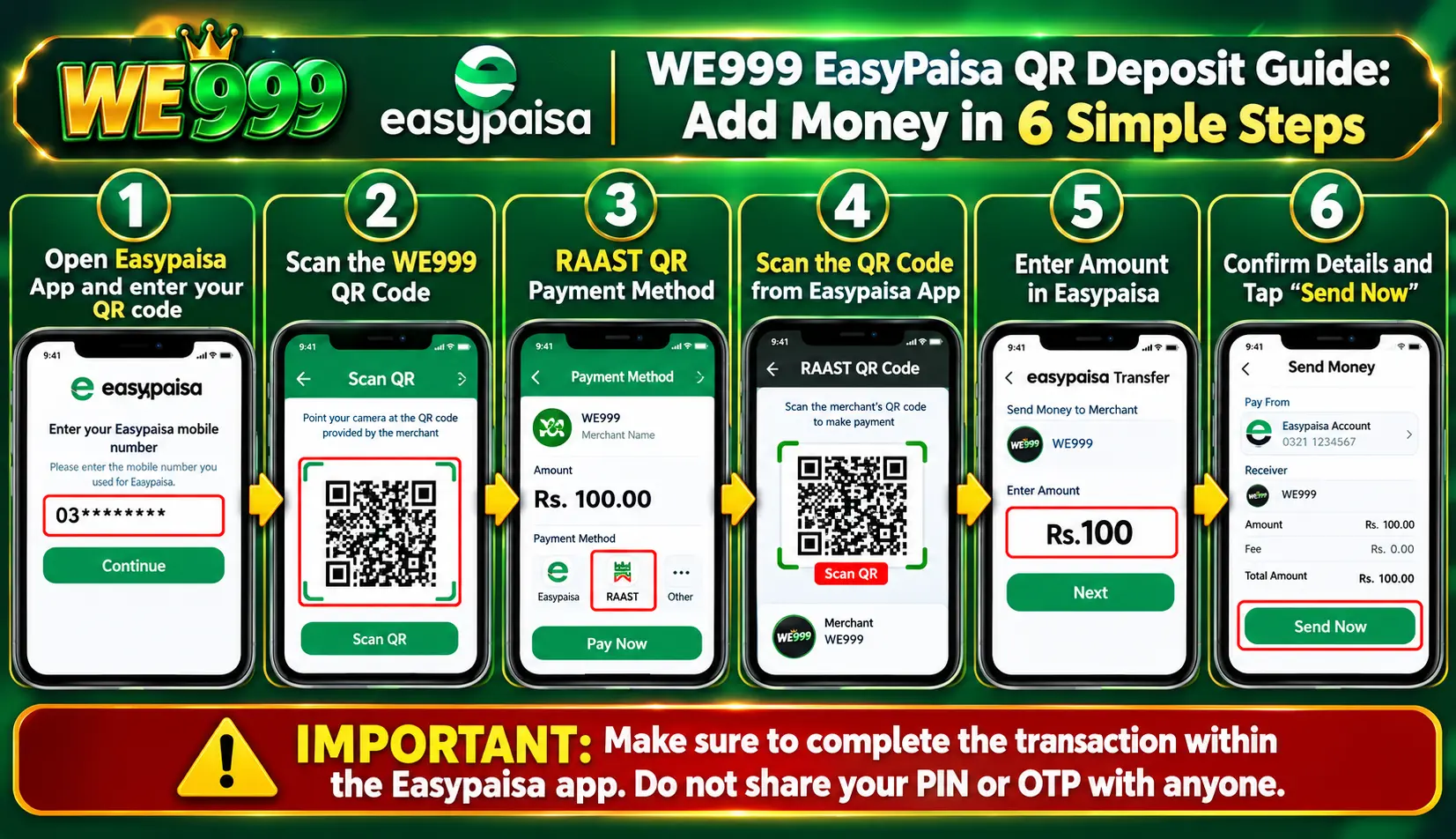
Based on the official platform guide, here is the exact six-step process for a WE999 EasyPaisa QR deposit. Follow these steps to fund your account safely and instantly without needing to contact customer support.
Legal Disclaimer
Online gaming and real-money deposits may be restricted by local laws. Check your local laws and consult a qualified lawyer before participating. Play responsibly, never risk money you cannot afford to lose, and never share your EasyPaisa PIN or OTP.
Table of Contents
The 6-Step WE999 EasyPaisa QR Deposit Process

Follow these steps exactly as shown in the app to ensure your deposit is credited automatically.
Step 1: Enter Your EasyPaisa Mobile Number
When you open the deposit page on WE999 and select EasyPaisa, the first screen will ask for your mobile number. Enter your 11-digit EasyPaisa number (starting with 03) and tap Continue.
Step 2: Save the QR Code
The system will generate a specific QR code for your transaction. You must tap the Save QR button. This saves the image directly to your phone’s gallery so you can use it in the EasyPaisa app.
Step 3: Open RAST QR in EasyPaisa
Now, leave the WE999 app (but don’t close it) and open your EasyPaisa app. On the home screen, navigate to the RAST QR feature.
Step 4: Select Image from Gallery
Inside the RAST QR scanning screen, you will see a camera view. Look for the option that says Photos or Gallery (usually a small icon in the corner). Tap it and select the QR code image you saved in Step 2.
Step 5: Enter the Exact Amount
Once the QR code is scanned, the EasyPaisa app will display the recipient’s details. You must now enter the exact same amount that was shown on the WE999 deposit page. Do not round the number up or down.
Step 6: Review and Press “Send Now”
Review the transaction summary on your screen. Ensure the amount and the recipient details are correct. Finally, tap Send Now to complete the payment.
The Most Important Rule: Do Not Close the Page
At the bottom of the deposit screen, there is a strict warning: “Do not close the page until the payment is fully completed.”
If you close the WE999 app while the EasyPaisa transaction is processing, the system might not recognize your payment. This can lead to a delayed deposit or a missing balance. Wait on the screen until you receive the success confirmation. This is the most common mistake players make when trying to add money to WE999.
Troubleshooting: What If the Deposit Fails?
If your balance does not update after pressing “Send Now”:
- Check your EasyPaisa history: Ensure the money actually left your wallet.
- Wait a few minutes: Sometimes network congestion causes a slight delay.
- Do not resubmit: If the money left your wallet, do not send it again.
- Contact Support: If 20 minutes pass and the balance is still missing, contact WE999 support with your Transaction ID (TxID) from EasyPaisa.
Continue Reading: The Complete WE999 Guide
Now that you know how to deposit, are you ready to master the platform?
Read our full WE999 Game Download, Login & 31-Level VIP Guide Here
Discover how to unlock the 30-level VIP system, which games pay the best, and how to withdraw your winnings without issues